Lonely: A Modern Slab Serif Font for Impactful Design
Fonts are more than just tools for writing—they’re the visual heartbeat of any design. They convey tone, evoke emotion, and shape how audiences perceive content. In this digital age, where attention spans are short and competition for visibility is fierce, choosing the right font can make all the difference. One such font that has been gaining traction among designers is Lonely, a modern slab serif typeface known for its bold, clean lines and striking presence.
What Is the Lonely Font?
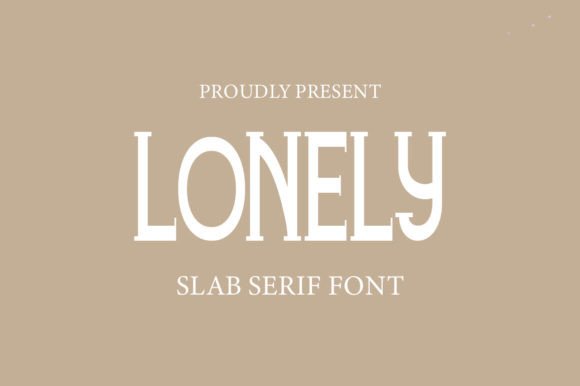
Lonely is a contemporary slab serif font designed to blend classic elegance with modern minimalism. Slab serif fonts are characterized by their thick, block-like serifs—those small strokes attached to the ends of letters—which give them a strong, stable look. Unlike traditional serif fonts like Times New Roman or Georgia, slab serifs tend to be bolder and more assertive in appearance.
What sets Lonely apart is its simplicity and sharp aesthetic. It doesn’t rely on ornate details to make an impression; instead, it uses clean shapes and balanced proportions to create a sense of authority and clarity. This makes it particularly well-suited for both print and digital media, especially when legibility and impact are key considerations.
The Origins of Slab Serif Fonts
To understand the significance of Lonely, it’s helpful to take a quick look at the history of slab serif fonts. These fonts first appeared in the early 19th century as part of the industrial revolution's typography boom. Their boldness made them ideal for headlines in newspapers and posters, where they needed to stand out from a distance.
Fast forward to today, slab serifs have found new life in web design, branding, and editorial work. With the rise of flat design and minimalist aesthetics, there’s a growing demand for fonts that offer weight and character without being overly complex. Lonely fits perfectly into this trend.
Why Choose the Lonely Font?
If you're looking to elevate your design projects, Lonely could be the perfect choice. Here are some reasons why:
- Legibility: Despite its bold nature, Lonely maintains excellent readability across various sizes and mediums.
- Versatility: The font works equally well in body text, headings, logos, and even UI elements due to its consistent stroke width and clear letterforms.
- Modern Appeal: Its sleek design aligns with current trends in graphic and web design, making it ideal for creating up-to-date, professional-looking content.
- Emotional Resonance: The name “Lonely” may suggest something somber, but the font itself is anything but. Instead, it evokes a sense of strength and confidence, which can be very useful in conveying a serious or trustworthy message.
Common Misconceptions About the Lonely Font
One common misunderstanding about Lonely is that it’s only suitable for dark or sad-themed designs because of its name. While names can influence perception, the visual characteristics of the font tell a different story. Lonely is named not for its mood, but perhaps for its ability to stand alone and command attention in a crowded visual space.
Another misconception is that slab serif fonts are outdated. On the contrary, many modern brands and publications use slab serifs to add a touch of sophistication and timelessness to their visuals. Lonely proves that these fonts can evolve while maintaining their core appeal.
Where Can You Use the Lonely Font?
With its unique blend of boldness and simplicity, Lonely can be applied in a wide range of contexts. Let’s explore some practical applications:
1. Branding and Logo Design
Logos often need to be simple yet memorable. Lonely provides the necessary contrast and visual weight to help brand names stand out. Whether used in uppercase for a powerful statement or in lowercase for a softer approach, it adds a distinctive edge to any logo.
Example: Imagine a startup tech company using Lonely in its logo. The font would instantly communicate professionalism and innovation, helping to establish trust with potential clients or investors.
2. Web and App Design
In the world of digital design, user experience (UX) is paramount. Lonely’s crisp edges and uniform stroke widths ensure that it remains highly legible on screens, even at smaller sizes. It pairs well with sans-serif fonts for body text, creating a visually appealing hierarchy without overwhelming the reader.
Tip: When using Lonely in web design, consider using lighter weights for subheadings and heavier ones for titles to maintain visual balance and improve navigation.
3. Print Media and Editorial Work
Magazines, newspapers, and book covers benefit from the use of Lonely. Its bold style draws readers in, while its structured form ensures that the text is easy to read. It’s especially effective for headlines and pull quotes that need to capture attention quickly.
Real-World Example: A fashion magazine might use Lonely for its cover title and feature headlines, giving the publication a modern, confident look that appeals to its target audience.
4. Business Presentations and Reports
Businesses often require a font that conveys reliability and authority. Lonely delivers exactly that with its clean and professional appearance. It’s also great for infographics and charts where data needs to be presented clearly and stylishly.
Lonely can be used in PowerPoint slides, annual reports, or marketing brochures to enhance the overall design quality and ensure that the message is delivered with impact.
5. Creative Projects and Personal Use
For artists, illustrators, and hobbyists, Lonely offers a fresh way to incorporate typography into creative pieces. Its bold structure makes it ideal for posters, album covers, and social media graphics where a strong visual identity is essential.
Pro Tip: Try combining Lonely with decorative or script fonts to create eye-catching layouts that balance strength with flair.
How to Incorporate the Lonely Font Effectively
Now that you know where to use Lonely, let’s discuss how to use it effectively. Good typography isn't just about selecting the right font—it's about knowing how to pair it, size it, and apply it in ways that enhance the overall design.
Pairing Fonts with Lonely
Font pairing is an art in itself. To keep your design cohesive, it’s important to choose complementary fonts that don’t clash. Here are a few suggestions for pairing Lonely with other typefaces:
- Sans-Serif Fonts: Pair Lonely with a clean sans-serif like Helvetica or Roboto for a modern, professional look.
- Script Fonts: For a more creative vibe, try matching it with a soft script font like Great Vibes or Allura. This combination adds personality without losing clarity.
- Monospace Fonts: If you're designing something with a tech or coding theme, Lonely can be paired with monospace fonts like Courier Prime or Fira Code to emphasize functionality and precision.
Choosing the Right Weight and Style
Most modern fonts, including Lonely, come in multiple weights and styles (e.g., regular, bold, italic). Selecting the appropriate variant is crucial for achieving the desired effect.
For example:
- Regular weight is best for body text where readability is important.
- Bold weight is ideal for headlines and titles that need to stand out.
- Italic can be used sparingly for emphasis or stylistic variation.
Experimenting with different weights can help you create a dynamic layout that guides the viewer’s eye through the content naturally.
Color and Contrast Considerations
Color plays a big role in how Lonely appears. Since it’s a bold font, it can handle darker colors and still remain readable. However, it also looks stunning in grayscale or muted tones, allowing for a more subtle and refined presentation.
When using Lonely in high-contrast situations, such as white text on a black background, ensure that the spacing between characters is adequate to prevent overcrowding. Proper kerning and leading will go a long way in preserving its clean aesthetic.
Why Typography Matters in Modern Communication
In our fast-paced world, where we consume vast amounts of information daily, typography is one of the most powerful tools for communication. The right font can help your message be understood more clearly and remembered more easily.
Lonely is a prime example of how typography can bridge the gap between form and function. It doesn’t just look good—it enhances the message it carries. This is especially relevant in fields like marketing, education, and technology, where clarity and impact are essential.
Marketing and Advertising
In marketing, the goal is to grab attention and deliver a message quickly. Lonely does this exceptionally well thanks to its bold, modern look. Whether it's a billboard ad or a mobile banner, this font helps your message cut through the noise.
Use Case: A food delivery app might use Lonely in promotional materials to highlight limited-time offers, ensuring the deal stands out and encourages action.
Education and Learning Materials
Educational content benefits from clear and readable typography. While Lonely is bold, it doesn’t sacrifice legibility. This makes it a good option for headers in e-books, course materials, or presentations where visual hierarchy is important.
Using Lonely in educational settings can also help break up dense text and make learning more engaging for students of all ages.
Technology and User Interfaces
In software and website design, usability is key. Lonely can be used in UI elements like buttons, menus, and alerts to provide a sense of control and clarity. Its consistent stroke width and open apertures make it easier to read on screens, reducing cognitive load for users.
Many developers and UX designers are turning to slab serif fonts like Lonely for their dashboards and admin panels, where a balance of formality and readability is required.
Getting Started with the Lonely Font
If you're ready to bring Lonely into your design workflow, here’s what you need to know:
Availability and Licensing
Before downloading or using Lonely, it’s important to check its licensing terms. Some fonts are free for personal use but require a license for commercial projects. Always verify the usage rights, especially if you're working on client-based or revenue-generating content.
You can find Lonely on popular font marketplaces like Adobe Fonts, Google Fonts, or independent platforms like MyFonts and Font Squirrel. Make sure to review each site’s licensing agreements carefully.
Tools and Software Compatibility
Lonely is compatible with most design software, including:
- Adobe Photoshop and Illustrator
- Canva and Figma
- Microsoft Word and PowerPoint
- Web development frameworks like CSS and HTML
This broad compatibility means you can use it across different platforms and workflows without running into technical issues.
Best Practices for Using Lonely
To get the most out of Lonely, follow these best practices:
- Limit its use to key typographic elements to avoid visual fatigue.
- Ensure sufficient contrast between the font color and background.
- Use proper spacing and alignment to maintain a polished appearance.
- Avoid overusing special characters or ligatures unless they serve a specific purpose.
These tips will help you harness the power of Lonely without compromising the overall design integrity.
Final Thoughts: Embracing the Power of Lonely
Lonely is more than just another font—it’s a versatile tool that can transform your design projects. Whether you're working on branding, web design, editorial content, or creative visuals, this modern slab serif brings a unique combination of strength, clarity, and style to the table.
As we continue to navigate an increasingly digital world, the importance of thoughtful typography cannot be overstated. Fonts like Lonely remind us that even the smallest design choices can have a big impact. By understanding the principles behind typeface selection and applying them creatively, you can craft messages that resonate deeply with your audience.
So next time you're working on a project and wondering what font to use, consider Lonely. It might just be the missing piece you’ve been searching for.
If you want to explore more fonts or learn about typography fundamentals, feel free to visit our typography resources page.